


 Hatch Embroidery Digitizer
 Hatch Embroidery Composer
 Hatch Embroidery Personalizer
 Hatch Embroidery Organizer



















WORKS WITHBrotherBerninaJanomeBaby LockSingerTajimaBarudanHusqvarna VikingPfaff + more
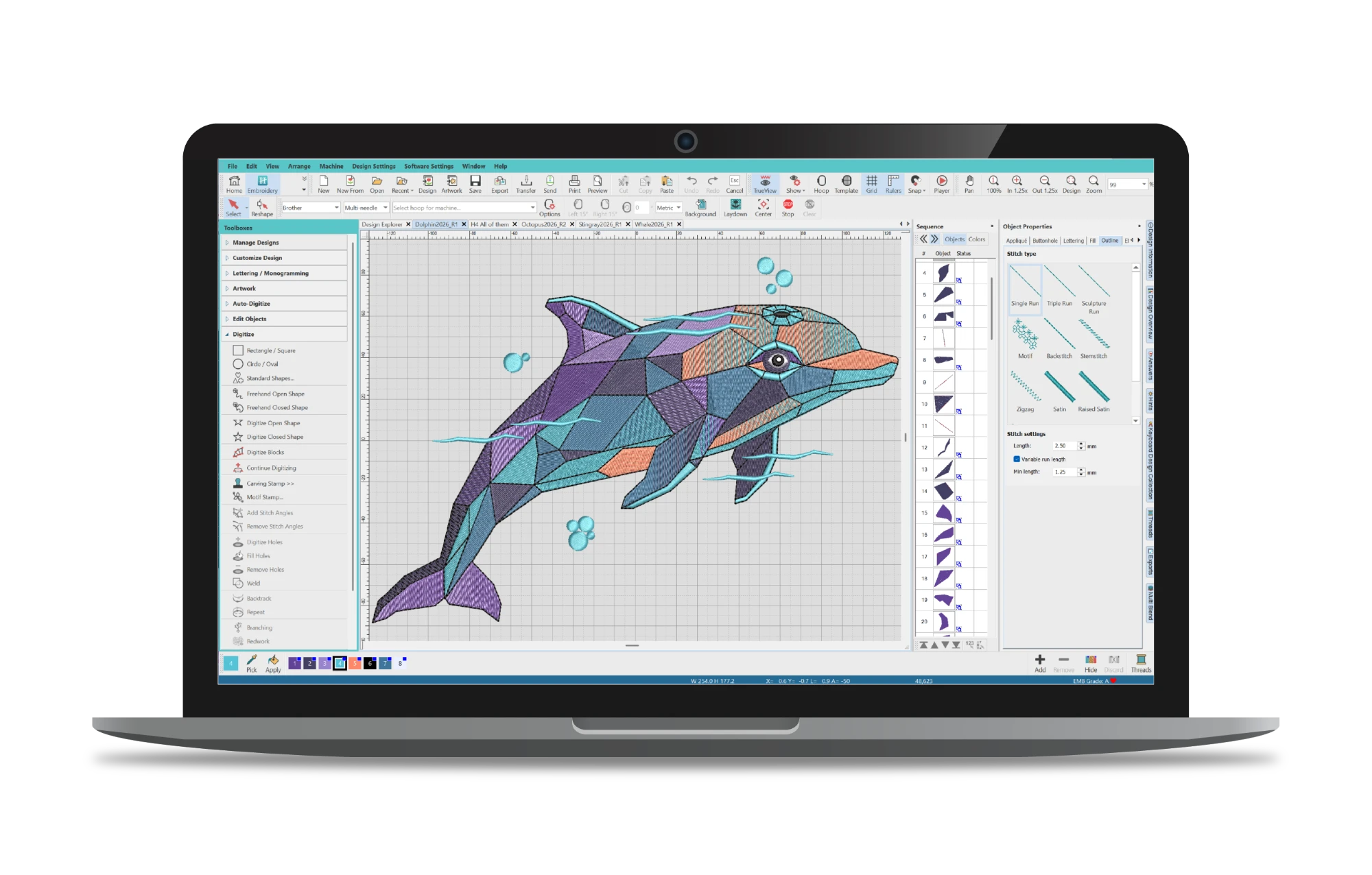

- Organize and manage embroidery designs quickly and easily
- Resize and recolor designs with automatic stitch recalculation
- Preview designs with realistic Stitch Player simulation
- Built-in hoop management and fabric optimization tools
Simple start to embroidery,
designed for confident first steps.
Keep your embroidery projects beautifully organized with Hatch Embroidery Organizer. Designed to simplify your embroidery workflow, Organizer helps you easily manage, customize, preview, and output embroidery designs all in one convenient place.
Quickly resize designs, change colors, preview stitch-outs with Stitch Player, and manage hoops with confidence. Whether you’re organizing a growing design library or preparing designs for stitching, Organizer makes embroidery simpler, faster, and more enjoyable.
AUD $282.58
One-time payment
- *All prices exclude applicable taxes
-
 30-Day Money-Back Guarantee
What you can do
Everything you need to
get started.
Organizer is the perfect starting point. Manage your design library, customize designs for your machine, and stitch with confidence - all without needing to digitize from scratch.
Find out more
Design Explorer
Search, sort, and browse your entire embroidery design library across your PC - all in one organized place.
Design Explorer
Your entire design library, organized and searchable.
Design Explorer gives you an integrated way to view, organize, and manage all your embroidery designs. Search, sort, and browse across your entire PC so you can find any design in seconds.
- Browse designs across all folders on your PC
- Search and sort by name, type, size, and more
- Preview designs before opening them
- Manage design folders and library locations
Find out more
Resize and Recolor
Change the size or colors of any design with automatic stitch recalculation - no manual rework needed.
Resize and Recolor
Change size or colors in seconds, without starting over.
Resize any design to fit a different garment or hoop, or change thread colors to match a customer's request. Hatch automatically recalculates stitch density and underlay so the quality stays consistent.
- Resize designs with automatic stitch recalculation
- Change individual thread colors or swap palettes
- Duplicate, mirror, and rotate existing designs
- Preview changes in realistic TrueView before stitching
Find out more
Stitch Player
Preview your design stitching out in realistic simulation before sending it to your machine.
Stitch Player
Watch your design stitch out before it ever hits the machine.
Stitch Player simulates your design stitching out in sequence, color by color, so you can check the result and catch any issues before you load it onto your machine. No wasted hooping time.
- Realistic simulation of the full stitch-out sequence
- Review color order and stitching direction
- Identify potential issues before stitching
- Adjust playback speed for detailed review
Find out more
Convert to Machine Formats
Convert your designs to the file formats used by most major embroidery machines. Batch-conversion saves even more time.
Convert to Machine Formats
One design file, ready for any machine on your list.
Convert designs to the stitch file formats used by most major embroidery machine brands. Need the same design in three formats? Use batch conversion to process multiple files at once.
- Supports formats for Brother, Janome, Bernina, Baby Lock, Singer, and more
- Batch-convert multiple designs at once to save time
- Optimize color changes during conversion
- Export directly to your machine folder
Find out more
Auto Fabric
Choose your fabric type and Hatch automatically adjusts underlay, pull compensation, and density - plus recommends the right stabilizer.
Auto Fabric
Choose your fabric, Hatch handles the stitch settings.
Select your fabric type and Hatch automatically adjusts underlay, pull compensation, and stitch density to give you the best results on that material. It also recommends the right stabilizer so you're always set up for success.
- Automatic underlay, pull compensation, and density adjustment
- Covers a wide range of fabric types
- Stabilizer recommendations for your chosen fabric
- Saves time and reduces guesswork on every project
Find out more
Center All Tool
Instantly center your design and hoop in one click for faster setup and cleaner positioning.
Center All Tool
Perfect positioning in one click, every time.
Instantly center your design and hoop in one click for faster setup and cleaner positioning. No manual adjustment needed - the Center All tool aligns everything to the design window automatically.
- One-click centering of design and hoop
- Aligns to design window automatically
- Eliminates manual positioning
- Great for consistent multi-hoop setups
WHAT'S NEW IN HATCH 4
More power,
smarter workflows.
Hatch Embroidery 4 introduces 25+ new and enhanced features. From a smarter Design Explorer to Enhanced Grids, Guides & Snap and the built-in AI Answers assistant - the tools you use every day just got better. Find out which features are available in Organizer.
AI Answers
A built-in AI assistant that answers your embroidery questions instantly - right inside the software.
Enhanced Grids, Guides & Snap
Faster alignment and precise design placement with improved snapping behavior.
Enhanced Design Explorer
Easier, faster design management across your entire design library.
Enhanced Warning Controls
Stay informed about potential stitch issues without being interrupted by distractions.
Enhanced Connector & Trim Display
Preview stitch paths and connection points clearly before sending to your machine.
Enhanced Display Colors
Better visibility across all design elements for more confident editing.
Enhanced Control Point Display
Edit complex designs with greater clarity and precision.
Wireless Connection for Brother
Send designs directly to your Brother machine via Wi-Fi. No USB stick required.
Exports Docker
Track background conversions and export status in real time.
Enhanced Auto Connectors & Trims
Cleaner stitch paths with fewer manual adjustments needed before stitching.
Learn fast,
create more.
Hatch Academy is the only online learning platform dedicated to Hatch Embroidery software. Designed by Hatch experts, it offers 72+ comprehensive courses with over 400 lessons.
Whether you're a beginner or an advanced user, Hatch Academy helps you unlock the full potential of your embroidery projects.
Free for Hatch Embroidery Digitizer owners!
72+
COURSES
400+
LESSONS
30k+
COMMUNITY
FREQUENTLY ASKED
Questions?
answered.
Start here if you need help:
- Browse the FAQs on this page
- Visit the Hatch Help Center
- Explore the Online User Guide
- Submit a support ticket
Our support team typically replies within one business day.
Is Organizer right for me if I'm new to embroidery?
Yes. Organizer is designed for embroiderers who want to work with existing designs rather than create from scratch. Most Organizer customers simply want to resize a design, change the colors, and convert it to their machine format - and Organizer does all of that with ease.
Can I add text or lettering with Organizer?
No - adding lettering, names, or monograms to designs requires Hatch Embroidery Personalizer or above. Organizer is designed for working with existing designs - resizing, recoloring, and converting them for your machine. If personalizing designs with text is something you want to do, Personalizer is the right level for you and includes 66 professionally digitized fonts plus monogramming tools.
What's actually new in Hatch 4?
Hatch 4 introduces over 25 new and enhanced features. For Organizer users, this includes the AI Answers assistant, Enhanced Design Explorer, Enhanced Grids and Guides, Enhanced Connector and Trim Display, Enhanced Display Colors, improved Warning Controls, and wireless transfer to supported Brother machines. Find out which levels these features are available in here.
I already own Hatch Embroidery. How do I upgrade?
If you already own any level or version of Hatch Embroidery (versions 1 to 3), sign in to your Hatch account and your personalized upgrade pricing will be displayed automatically. You don't need to contact support. Designs you created in earlier versions can be opened and edited in Hatch 4.
Does Organizer work with my embroidery machine?
Most likely. Hatch Embroidery supports the file formats used by most major brands including Brother, Janome, Bernina, Baby Lock, Singer, Husqvarna Viking, Pfaff, Tajima, Barudan, and many others. Hatch Embroidery 4 also adds direct wireless transfer to supported Brother machines.
What are the system requirements?
Most modern Windows PCs purchased in recent years will meet the requirements. We recommend reviewing the full system requirements before installing. Hatch 4 runs on 64-bit Windows 11 systems and performs best with a multi-core processor, SSD storage, and 16GB or more RAM.
Is Hatch Embroidery sold as a subscription?
Can I try it before I buy?
If you do not already own a Hatch license, yes - the 30-day free trial gives you full access to all features and all four levels with no credit card required. You can switch between Organizer, Personalizer, Composer, and Digitizer during the trial to find the right fit.
If you already own a license, the trial is unavailable. To experience Hatch 4 you can purchase the update, and if you are unhappy with the new features, there is a no-questions 30-day money-back guarantee.
Can I upgrade to a higher level later?
Yes, absolutely. You can upgrade from Organizer to Personalizer, Composer, or Digitizer at any time. Simply sign in to your Hatch account to see your personalized upgrade pricing. All your existing designs and settings carry across when you upgrade.
Try Organizer
free for 30 days
Enjoy unlimited use of Hatch Embroidery Organizer Software
- All product levels included
- Free video tutorials and step-by-step training
- Access to Hatch Academy
- Lots of fun, no obligation
No credit card required for trial.
Windows 11 only trial · 2 GB download
Paid licenses compatible with Virtual Machines and Macs